
Vue2 插件化开发
开发一个 Message 插件, 在屏幕中显示一个信息
目录结构
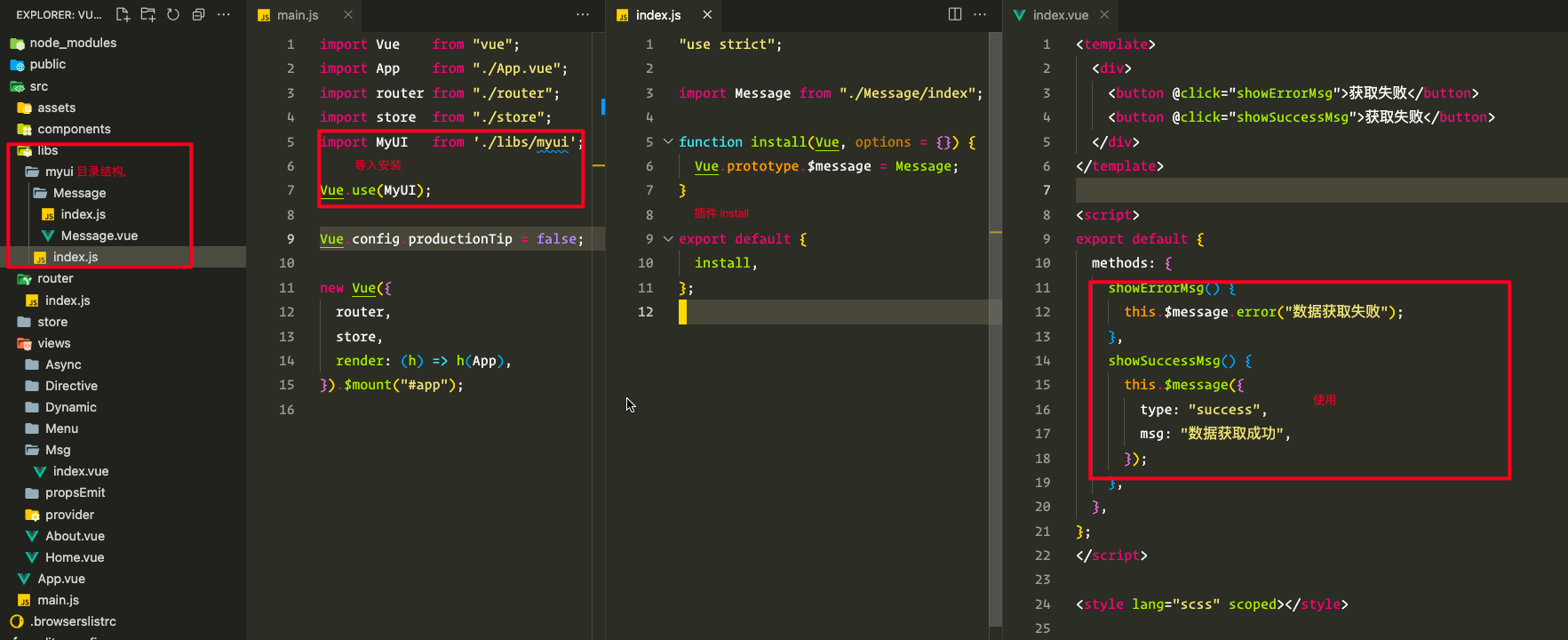
代码实现
html
<!-- Message/Message.vue -->
<template>
  <div v-show="visible" class="message-box" :class="type">{{ msg }}</div>
</template>

<script>
  export default {
    data: () => ({
      type: "",
      msg: "",
      onClose: null,
      visible: true,
      duration: 1000,
    }),
    mounted() {
      this.timer = null;
      this.startTimer();
    },
    methods: {
      close() {
        this.visible = false;
        this.clearTimer();
        typeof this.onClose === "function" && this.onClose();
      },
      startTimer() {
        this.timer = setTimeout(this.close, this.duration);
      },
      clearTimer() {
        this.timer && clearTimeout(this.timer);
      },
    },
  };
</script>

<style lang="scss" scoped>
  .message-box {
    position: fixed;
    top: 30px;
    left: 50%;
    transform: translateX(-50%);
    z-index: 200;
    min-width: 200px;
    text-align: center;
    padding: 5px 10px;
    color: #fff;
    border-radius: 3px;
    font-size: 14px;
    &.info {
      background: #c6e2ff;
    }
    &.error {
      background: #f56c6c;
    }
    &.success {
      background: #67c23a;
    }
  }
</style>js
// Message/index.js
"use strict";
import Vue from "vue";
import MessageVue from "./Message.vue";

// Vue.extend 继承 Vue 类
const MessageClass = Vue.extend(MessageVue);
const MessageTypes = ["success", "warning", "info", "error"];

// MessageComponent 的 vm 实例
let instance;

function Message(options = { type: "info", msg: "" }) {
  options.onClose = Message.close;
  instance = new MessageClass({
    data: options,
  });
  instance.$mount(); // 手动挂载
  document.body.append(instance.$el); // 将 $el 添加到 body
}

// 可以直接 Message() 也可以 Message.success() 调用
MessageTypes.forEach((item) => {
  Message[item] = function (msg) {
    if (typeof msg !== "string") {
      throw new TypeError("[Message]: msg must be a string");
    }
    return Message({ type: item, msg });
  };
});

// 销毁实例
Message.close = function () {
  instance.$el.remove();
  instance.$destroy();
  instance = null;
};

export default Message;Vue3 插件化开发
目录结构
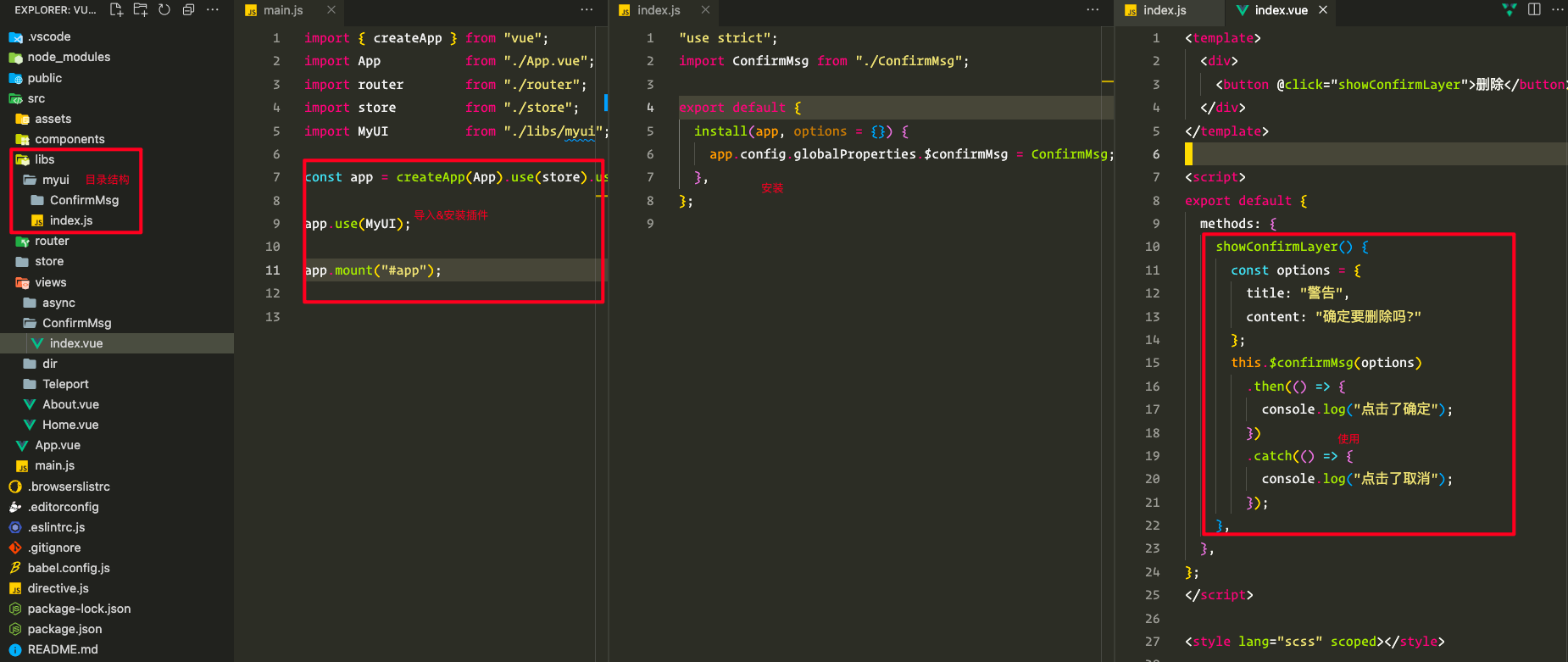
源码实现
html
<!-- ConfirmMsg/index.vue -->
<template>
  <teleport to="body">
    <div v-show="visible" class="layer-mask">
      <div class="layer-main">
        <div class="layer-header">{{ data.title }}</div>
        <div class="layer-content">{{ data.content }}</div>
        <div class="layer-footer">
          <button class="btn cancel" @click="cancel">取消</button>
          <button class="btn confirm" @click="confirm">确定</button>
        </div>
      </div>
    </div>
  </teleport>
</template>

<script setup>
  import { reactive, ref, defineExpose } from "vue";

  const visible = ref(true);
  const data = reactive({
    title: "",
    content: "",
  });

  // onConfirm(resolve), onCancel(reject), onClose(ConfirmMsg.close)
  let onConfirm, onCancel, onClose;

  function init({ resolve, reject, close, options }) {
    onConfirm = resolve;
    onCancel = reject;
    onClose = close;
    data.title = options.title;
    data.content = options.content;
  }
  defineExpose({ init });

  const cancel = () => exec(onCancel);
  const confirm = () => exec(onConfirm);
  function exec(fn) {
    visible.value = false;
    typeof fn === "function" && fn.call(this);
    typeof onClose === "function" && onClose(this);
  }
</script>

<style lang="scss" scoped>
  .layer-mask {
    position: fixed;
    top: 0;
    left: 0;
    bottom: 100%;
    right: 100%;
    width: 100%;
    height: 100%;
    background: rgba(0, 0, 0, 0.5);
    display: flex;
    align-items: center;
    justify-content: center;
    .layer-main {
      min-width: 300px;
      background: #fff;
      padding: 10px 20px;
      .layer-header {
        font-weight: 500;
      }
      .layer-content {
        padding: 30px 0;
        text-align: center;
      }
      .layer-footer {
        display: flex;
        justify-content: flex-end;
        .btn {
          border: none;
          color: #fff;
          padding: 5px 15px;
          &.confirm {
            background: #3f9eff;
          }
          &.cancel {
            margin-right: 20px;
            background: #f42c2e;
          }
        }
      }
    }
  }
</style>js
// ConfirmMsg/index.js
"use strict";

import { createApp } from "vue";
import ConfirmMsgVue from "./index.vue";

let instance; // ConfirmMsg 实例, 一个 Proxy 对象
let appCtx; // 应用实例可以理解为 getCurrentInstnace() 返回的结果,
// 注意这个 appCtx 和 setup(ctx) 这个参数是不同的
// appCtx 是组件的执行上下文, 而 setup(ctx) 只是 setup 函数
// 执行是时的上下文

function ConfirmMsg(options = { title, content }) {
  return new Promise((resolve, reject) => {
    const frag = document.createDocumentFragment();
    appCtx = createApp(ConfirmMsgVue);
    instance = appCtx.mount(frag);
    instance.init({
      resolve,
      reject,
      close: ConfirmMsg.close,
      options,
    });
  });
}

// 卸载组件 && 销毁实例
ConfirmMsg.close = function () {
  instance.$el.remove();
  appCtx.unmount();
  instance = null;
};

export default ConfirmMsg;