
下载地址:
字体推荐
- nerdfonts
- programmingfonts 在线预览字体效果
设置
json
{
  "window.zoomLevel": 1,
  "window.commandCenter": false,
  "editor.fontSize": 14,
  "editor.fontLigatures": false,
  "editor.fontFamily": "'Hack Nerd Font Mono', 'JetBrainsMono Nerd Font Mono', 'Maple Mono NF'",
  "editor.fontWeight": 200,
  "terminal.integrated.fontFamily": "'Hack Nerd Font Mono', 'JetBrainsMono Nerd Font Mono', 'Maple Mono NF'",
  "terminal.integrated.fontSize": 16,
  "terminal.integrated.suggest.enabled": false,
  "terminal.integrated.tabs.enabled": false,
  "editor.codeLens": false,
  "editor.stickyScroll.enabled": false,
  "editor.accessibilitySupport": "off",
  "editor.wordWrap": "off",
  "editor.cursorWidth": 1,
  "editor.lineHeight": 1.4,
  "editor.minimap.enabled": false,
  "editor.minimap.maxColumn": 100,
  "editor.minimap.renderCharacters": false,
  "editor.minimap.showSlider": "always",
  "editor.scrollbar.horizontal": "hidden",
  "editor.scrollbar.vertical": "hidden",
  "editor.scrollbar.horizontalScrollbarSize": 0,
  "editor.scrollbar.verticalScrollbarSize": 0,
  "editor.hover.enabled": "on",
  "editor.hover.sticky": true,
  "editor.hover.delay": 1500,
  "editor.quickSuggestionsDelay": 100,
  "editor.suggest.shareSuggestSelections": true,
  "editor.defaultFormatter": "prettier.prettier-vscode",
  "editor.quickSuggestions": {
    "other": "on",
    "strings": "on",
    "comments": "off"
  },
  "git.confirmSync": false,
  "git.enableSmartCommit": true,
  "git.autofetch": true,
  "git.openRepositoryInParentFolders": "never",
  "explorer.confirmDelete": false,
  "explorer.confirmDragAndDrop": false,
  "explorer.compactFolders": false,
  "breadcrumbs.enabled": false,
  "files.autoSave": "onFocusChange",
  "javascript.updateImportsOnFileMove.enabled": "always",
  "extensions.ignoreRecommendations": true,
  "update.mode": "start",
  "security.workspace.trust.untrustedFiles": "open",
  /////////////////////////////////////////
  // workbench
  /////////////////////////////////////////
  "workbench.startupEditor": "none",
  "workbench.iconTheme": "material-icon-theme",
  "workbench.colorTheme": "Monokai",
  "workbench.settings.editor": "json",
  "workbench.settings.useSplitJSON": true,
  "material-icon-theme.hidesExplorerArrows": true,
  "extensions.experimental.affinity": {
    "asvetliakov.vscode-neovim": 1
  },
  //////////////////////////////////////////////////////////////////////
  // whichkey: https://vspacecode.github.io/docs/whichkey
  // defaults: https://vspacecode.github.io/docs/default-keybindings
  //////////////////////////////////////////////////////////////////////
  "whichkey.bindingOverrides": [
    {
      // 搜索文件
      "keys": " ",
      "name": "Search files",
      "type": "command",
      "command": "workbench.action.quickOpen"
    },
    {
      // 搜索命令
      "keys": "/",
      "name": "Commands",
      "type": "command",
      "command": "workbench.action.showCommands"
    },
    {
      // 格式化文档
      "keys": "f.f",
      "name": "Format document",
      "type": "command",
      "command": "editor.action.formatDocument"
    },
    {
      // 关闭其他编辑器
      "keys": "b.o",
      "name": "Close other editors",
      "type": "command",
      "command": "workbench.action.closeOtherEditors"
    },
    {
      // 关闭当前标签左边的所有编辑器
      "keys": "b.l",
      "name": "Close buffer to the left",
      "type": "command",
      "command": "workbench.action.closeEditorsToTheLeft"
    },
    {
      // 关闭当前标签右边的所有编辑器
      "keys": "b.r",
      "name": "Close buffer to the right",
      "type": "command",
      "command": "workbench.action.closeEditorsToRight"
    },
    {
      // 将当前标签向左移动
      "keys": "b.H",
      "name": "Move buffer to the left",
      "type": "command",
      "command": "workbench.action.moveEditorLeftInGroup"
    },
    {
      // 将当前标签向右移动
      "keys": "b.L",
      "name": "Move buffer to the right",
      "type": "command",
      "command": "workbench.action.moveEditorRightInGroup"
    },
    {
      "keys": "r.n",
      "name": "Rename symbol",
      "type": "command",
      "command": "editor.action.rename"
    },
    {
      // reload window
      "keys": "r.s",
      "name": "reload widnow",
      "type": "command",
      "command": "workbench.action.reloadWindow"
    },
    {
      // replace
      "keys": "r.r",
      "name": "reolace",
      "type": "command",
      "command": "editor.action.startFindReplaceAction"
    },
    {
      // 关闭其他编辑器
      "keys": "w.o",
      "name": "close other editor",
      "type": "command",
      "command": "workbench.action.closeEditorsInOtherGroups"
    },
    {
      // <leader>a
      "keys": "a",
      "name": "+ai",
      "type": "bindings",
      "bindings": [
        {
          "key": "a",
          "name": "github copilot chat",
          "type": "command",
          "command": "workbench.action.toggleAuxiliaryBar"
        }
      ]
    },
    {
      // <leader>c
      "keys": "c",
      "name": "+code",
      "type": "bindings",
      "bindings": [
        {
          // CodeAction: Qucik Fix
          "key": "a",
          "name": "Qucik Fix",
          "type": "command",
          "command": "editor.action.quickFix"
        },
        {
          // Qucik Fix
          "key": "n",
          "name": "generate comment",
          "type": "command",
          "command": "codeium.refactorCodeBlock"
        }
      ]
    },
    {
      // <leader>o
      "keys": "o",
      "name": "+open",
      "type": "bindings",
      "bindings": [
        {
          // open url in browser
          "key": "u",
          "name": "Open in browser",
          "type": "command",
          "command": "editor.action.openLink"
        }
      ]
    },
    {
      // <leader>q
      "keys": "q",
      "name": "+session",
      "type": "bindings",
      "bindings": [
        // please install Project Manager plugin first
        {
          "key": "l",
          "name": "switch project",
          "type": "command",
          "command": "workbench.action.openRecent"
        },
        {
          "key": "q",
          "name": "quit",
          "type": "command",
          "command": "workbench.action.closeWindow"
        }
      ]
    }
  ]
}json
[
  {
    // 在编辑器/任意输入框没有焦点的时: 获取焦点
    "key": "escape",
    "command": "workbench.action.focusFirstEditorGroup",
    "when": "!editorTextFocus && !textInputFocus && !editorFocus && !inputFocus"
  },
  {
    // nvim 模式: 打开 which-key 面板
    // 需要安装插件: which key
    // https://vspacecode.github.io/docs/whichkey
    "key": "space",
    "command": "whichkey.show",
    "when": "editorTextFocus && neovim.mode == 'normal'"
  },
  {
    // nvim 模式: 打开 lazygit
    // 需要安装插件: lazygit for vscode
    // https://github.com/Chaitanya-Shahare/lazygit-for-vscode
    "key": "ctrl+g",
    "command": "lazygit.openLazygit",
    "when": "editorTextFocus && neovim.mode == 'normal'"
  },
  {
    // nvim 模式: 打开 yazi
    // 需要安装插件: vscode yazi
    // https://github.com/vscode-yazi/vscode-yazi
    "key": "ctrl+f",
    "command": "vscodeyazi.openYazi",
    "when": "editorTextFocus && neovim.mode == 'normal'"
  },
  {
    // nvim 模式: 注释
    "key": "ctrl+\\",
    "command": "editor.action.commentLine",
    "when": "editorTextFocus && neovim.mode != 'insert'"
  },
  {
    // 移除默认的 ctrl + d
    "key": "ctrl+d",
    "command": "-vscode-neovim.ctrl-d",
    "when": "editorTextFocus && neovim.ctrlKeysNormal.d && neovim.init && neovim.mode != 'insert' && editorLangId not in 'neovim.editorLangIdExclusions'"
  },
  {
    // 移除默认的 ctrl + u
    "key": "ctrl+u",
    "command": "-vscode-neovim.ctrl-u",
    "when": "editorTextFocus && neovim.ctrlKeysNormal.u && neovim.init && neovim.mode != 'insert' && editorLangId not in 'neovim.editorLangIdExclusions'"
  },
  {
    // nvim模式:  向上移动
    "command": "vscode-neovim.send",
    "key": "ctrl+u",
    "when": "editorTextFocus && neovim.ctrlKeysNormal.u && neovim.init && neovim.mode != 'insert' && editorLangId not in 'neovim.editorLangIdExclusions'",
    "args": "<C-u>"
  },
  {
    // nvim模式:  向下移动
    "command": "vscode-neovim.send",
    "key": "ctrl+d",
    "when": "editorTextFocus && neovim.ctrlKeysNormal.d && neovim.init && neovim.mode != 'insert' && editorLangId not in 'neovim.editorLangIdExclusions'",
    "args": "<C-d>"
  },
  {
    // nvim模式: 切换命令行
    "key": "ctrl+x",
    "command": "workbench.action.terminal.toggleTerminal",
    "when": "terminal.active && neovim.mode == 'normal'"
  },
  {
    // nvim模式: 创建新的命令行tab
    "key": "ctrl+shift+x",
    "command": "workbench.action.terminal.new",
    "when": "terminal.active && terminalProcessSupported || terminalWebExtensionContributedProfile"
  },
  {
    // nvim模式: 切换侧边栏显示
    "key": "ctrl+e",
    "command": "workbench.view.explorer",
    "when": "editorTextFocus && neovim.mode == 'normal'"
  },
  {
    // nvim模式: 切换侧边栏显示
    "key": "ctrl+e",
    "command": "workbench.action.toggleSidebarVisibility",
    "when": "!editorTextFocus && neovim.mode == 'normal'"
  },
  {
    // nvim模式: 显示代码提示
    "key": "ctrl+o",
    "command": "editor.action.triggerSuggest",
    "when": "!suggestWidgetVisible && editorTextFocus && neovim.mode == 'insert'"
  },
  {
    // nvim模式: 隐藏代码提示
    "key": "ctrl+e",
    "command": "hideSuggestWidget",
    "when": "suggestWidgetVisible && editorTextFocus && neovim.mode == 'insert'"
  },
  {
    // nvim模式: 代码提示显示时: 选中上一个代码提示
    "key": "ctrl+k",
    "command": "selectPrevSuggestion",
    "when": "suggestWidgetVisible && suggestWidgetMultipleSuggestions && neovime.mode != 'normal'"
  },
  {
    // nvim模式: 代码提示显示时: 选中下一个代码提示
    "key": "ctrl+j",
    "command": "selectNextSuggestion",
    "when": "suggestWidgetVisible && suggestWidgetMultipleSuggestions && neovime.mode != 'normal'"
  },
  {
    // 在显示搜索文件输入框时: 选中上一个
    "key": "ctrl+k",
    "command": "workbench.action.quickOpenSelectPrevious",
    "when": "inQuickOpen"
  },
  {
    // 在显示搜索文件输入框时: 选中下一个
    "key": "ctrl+j",
    "command": "workbench.action.quickOpenSelectNext",
    "when": "inQuickOpen"
  },
  {
    // 在展开 snippets 后, 可以跳到上一个位置
    "key": "ctrl+h",
    "command": "jumpToPrevSnippetPlaceholder",
    "when": "editorTextFocus && hasPrevTabstop && inSnippetMode"
  },
  {
    // 在展开 snippets 后, 可以跳到下一个位置
    "key": "ctrl+l",
    "command": "jumpToNextSnippetPlaceholder",
    "when": "editorTextFocus && hasNextTabstop && inSnippetMode"
  },
  {
    // 当 codeAction 菜单显示的时候 c-k 选中上一个
    "key": "ctrl+k",
    "command": "selectPrevCodeAction",
    "when": "codeActionMenuVisible"
  },
  {
    // 当 codeAction 菜单显示的时候 c-j 选择下一个
    "key": "ctrl+j",
    "command": "selectNextCodeAction",
    "when": "codeActionMenuVisible"
  },
  {
    // 当 codeAction 菜单显示的时候 c-l 确认选择
    "key": "ctrl+l",
    "command": "acceptSelectedCodeAction",
    "when": "codeActionMenuVisible"
  },
  /////////////////////////////////////////////
  // 侧边栏目录树操作
  /////////////////////////////////////////////
  {
    "key": "ctrl+enter",
    "command": "revealFileInOS",
    "when": "filesExplorerFocus && !inputFocus"
  },
  {
    // 移除默认的 d 删除文件
    "key": "d",
    "command": "-deleteFile",
    "when": "explorerViewletVisible && filesExplorerFocus && !explorerResourceReadonly && !inputFocus"
  },
  {
    // 剪切文件
    "key": "d",
    "command": "filesExplorer.cut",
    "when": "explorerViewletVisible && filesExplorerFocus && !explorerResourceReadonly && !inputFocus"
  },
  {
    // 移除默认的 x 剪切文件
    "key": "x",
    "command": "-filesExplorer.cut",
    "when": "explorerViewletVisible && filesExplorerFocus && !explorerResourceIsRoot && !inputFocus"
  },
  {
    // x 将文件移动到回收站
    "key": "x",
    "command": "moveFileToTrash",
    "when": "explorerViewletVisible && filesExplorerFocus && !explorerResourceReadonly && !inputFocus"
  },
  {
    // 复制文件路径(相对路径)
    "key": "shift+y",
    "command": "copyFilePath",
    "when": "explorerViewletVisible && filesExplorerFocus && !explorerResourceReadonly && !inputFocus"
  },
  {
    // 复制文件路径(绝对路径)
    "key": "ctrl+y",
    "command": "copyRelativeFilePath",
    "when": "explorerViewletVisible && filesExplorerFocus && !explorerResourceReadonly && !inputFocus"
  }
]调试 vue/react 项目
推荐阅读 调试配置官方文档 调试配置中文文档 各种项目调试配置
调试 vue.js 项目
其实大多数时候更多的调试用的是 vue-devtools 和 console.log, 但是用编辑器调试并不是什么难事, 而且可以看到代码的运行流程, 这个很重要, 可以用来调试别人写好的开源项目的源码, 所以就学习记录以下 官网的具体步骤
1.修改打包程序配置文件, 开启 source-map
js
// vue-cli: vue.config.js
module.exports = {
  configureWebpack: {
    devtool: "source-map",
  },
};

// vite: vite.config.js
export default defineConfig({
  build: {
    sourcemap: true,
  },
});2.生成 debug 配置文件
- 点击
Debug->Run and Debug->Web App(Chrome) - 点击之后会生成
.vscode/launch.json, 且内容如下 - 如果不想点击, 手动创建也是没有问题的
jsonc
{
  // Use IntelliSense to learn about possible attributes.
  // Hover to view descriptions of existing attributes.
  // For more information, visit: https://go.microsoft.com/fwlink/?linkid=830387
  "version": "0.2.0",
  "configurations": [
    {
      "type": "chrome",
      "request": "launch",
      "name": "Launch Chrome against localhost",
      "url": "http://localhost:8080", // 这个位置修改项目的运行url
      "webRoot": "${workspaceFolder}",
    },
  ],
}3.启动测试
- 启动项目
bash
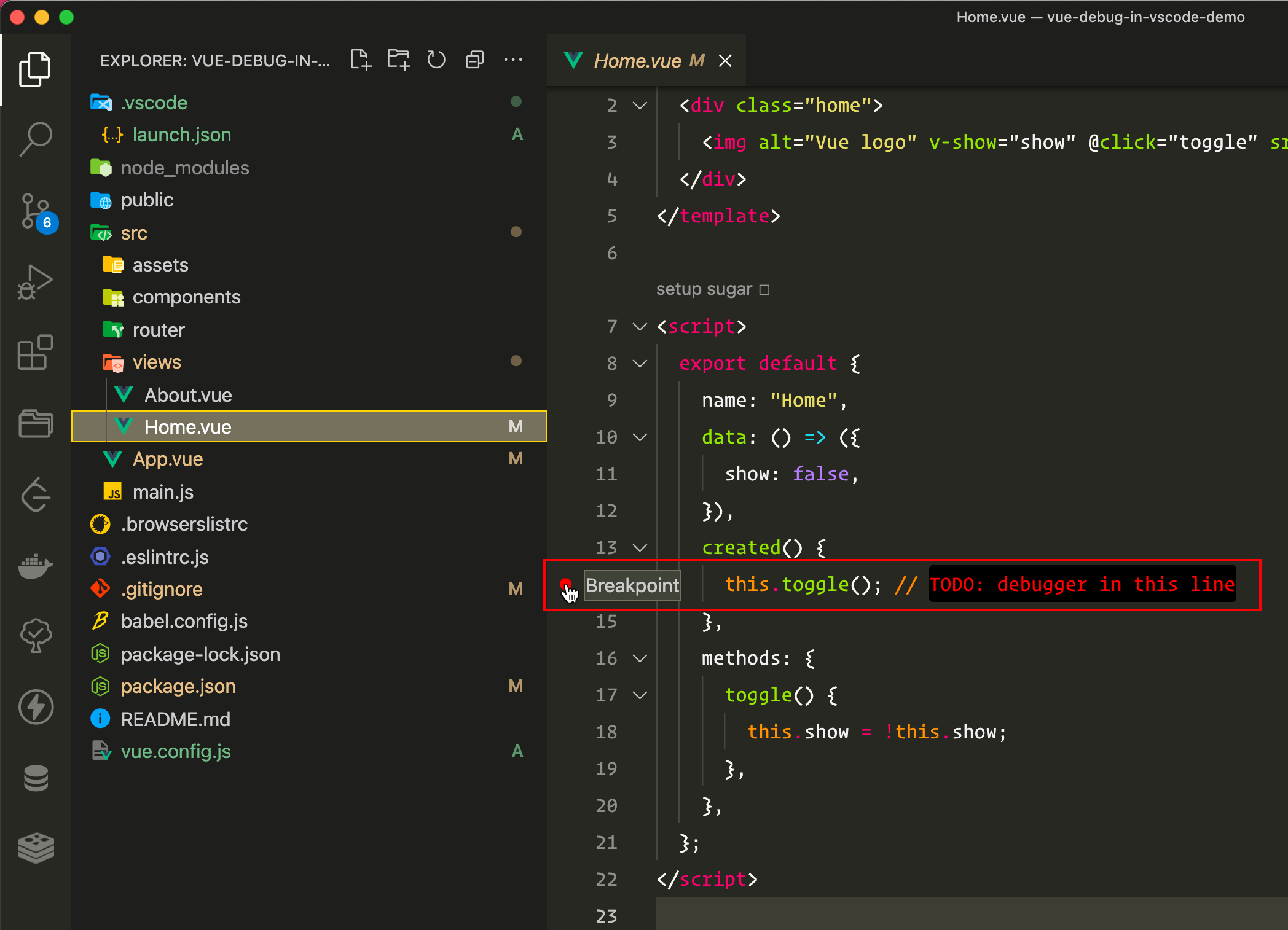
npm run dev- 先在项目中使用加断点, 或者手动使用
debugger语句
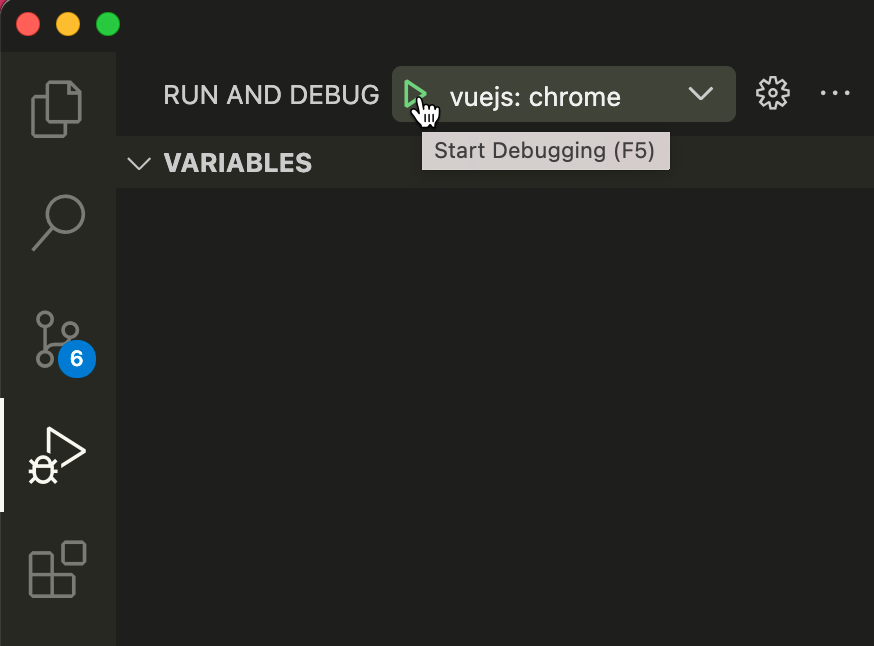
- 启动调试
配置好之后, 直接按快捷键 F5 或者手动点击启动
- 调试 react 的步骤和上面是一样的
调试 node.js 项目
不管是 express 还是 koa egg.js 调试步骤都是一样的, 主要是 launch.json 中的配置
1. 创建项目环境
bash
# 1. 安装 express 项目
npx express-generator express-debug-demo # 用脚手架创建项目
cd express-debug-demo
npm i

# 2. 安装 nodemon 方便调试, 不用脚手架自带的那个, 不好用
npm i nodemon -Djson
# 3. 修改 `package.json`, 添加调试的 scripts
"scripts": {
  "dev": "nodemon ./bin/www",
  "start": "node ./bin/www"
},2. 创建调试配置文件
在项目目录下新建 .vscode/launch.json
json
{
  // https://go.microsoft.com/fwlink/?linkid=830387
  "version": "0.2.0",
  "configurations": [
    {
      "type": "node",
      "request": "launch",
      "name": "启动程序",
      // 这个 program 配置选项很重要,如果你不是用脚手架创建的
      // 而是手动安装express然后导入的方式, 就要写你自己的
      // 入口文件路径比如 ${workspaceFolder}/app.js
      "program": "${workspaceFolder}/bin/www",
      "restart": true,
      "console": "integratedTerminal",
      "skipFiles": ["${workspaceRoot}/node_modules/**/*.js", "<node_internals>/**/*.js"]
    }
  ]
}3.调试/查看效果
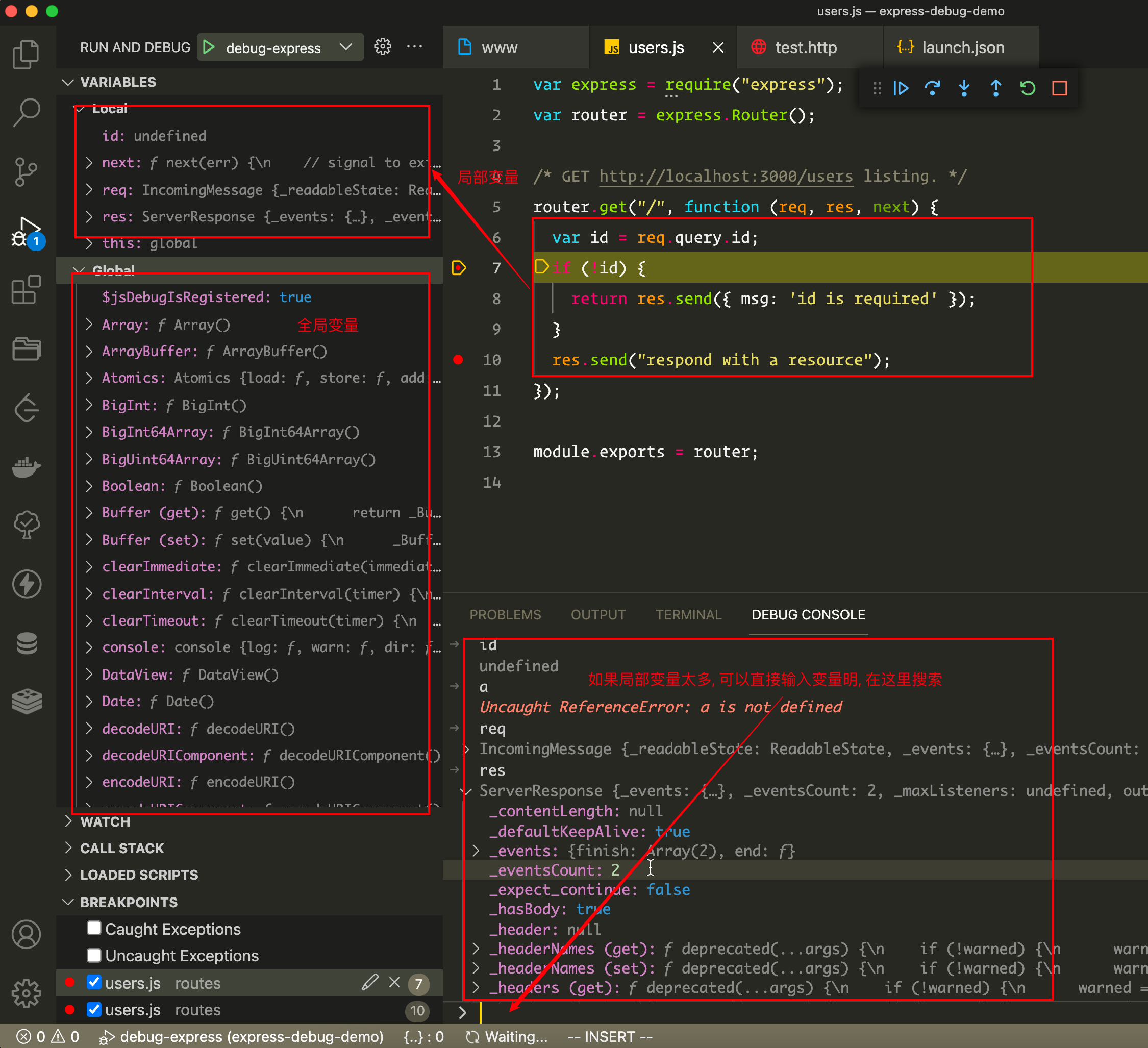
F5或者手动开启 debug- 加断点
- 发送请求, 让加断点位置的代码执行
4. 调试 egg.js 的调试配置
json
{
  "version": "0.2.0",
  "configurations": [
    {
      "name": "debug-egg-server",
      "type": "node",
      "request": "launch",
      "cwd": "${workspaceRoot}",
      "runtimeExecutable": "npm",
      "windows": { "runtimeExecutable": "npm.cmd" },
      "runtimeArgs": ["run", "debug"],
      "console": "integratedTerminal",
      "protocol": "auto",
      "restart": true,
      "port": 9229,
      "autoAttachChildProcesses": true
    }
  ]
}开发 vscode 插件
推荐阅读快速开始